
Silk Mobile
Table of Contents (Homepage)
- Overview
- Setting Up
- Getting Started
- How To
- Connecting Devices And Emulators
- Preparing Applications For Testing
- Managing Applications
- Recording Tests
- Working With Test Commands
- Adding Commands To Your Scripts
- Object Commands
- Click
- ClickCoordinate
- ClickIn
- ClickOffset
- Drag
- ElementGetProperty
- ElementGetTableRowsCount
- ElementListPick
- ElementListSelect
- ElementListVisible
- ElementScrollToTableRow
- ElementSendText
- ElementSetProperty
- ElementSwipe
- ElementSwipeWhileNotFound
- GetAllValues
- GetElementCount
- GetElementCountIn
- GetTextIn
- IsElementBlank
- IsElementFound
- IsFoundIn
- LongClick
- RunNativeAPICall
- SendWhileNotFound
- VerifyElementFound
- VerifyElementNotFound
- VerifyIn
- WaitForElement
- WaitForElementToVanish
- GetCoordinateColor
- DragDrop
- Application Commands
- Device Commands
- Web (Hybrid) Specific Commands
- Utilities Commands
- Monitoring Commands
- Configuration Commands
- ExtractLanguageFiles
- SetDefaultClickDownTime
- SetDefaultTimeOut
- SetDefaultWebView
- SetDragStartDelay
- SetInKeyDelay
- SetKeyToKeyDelay
- SetLanguage
- SetLanguagePropertiesFile
- SetShowImageInReport
- SetShowPassImageInReport
- SetShowReport
- SetSpeed
- SetThrowExceptionOnFail
- SetWebAutoScroll
- StartStepsGroup
- StopStepsGroup
- TextFilter
- Miscellaneous Commands
- Controlling Element Identification Rules
- Editing Test Objects
- Executing Test Scripts
- Report Of Executed Test
- Working From Code Environment
- Continuous Integration
- Layout Verification Tests
- Use Device Vitals Monitors
- Troubleshooting
- Terminology
Debugging Floating License Errors
Step 1: First verify that the host name that you are using is correct.
-
Try to ping the host name and verify its response, in the cmd.exe execute: ping <hostname>
-
In the following example the hostname is ws06-xp

-
If this step failed the issue could be one of the followings:
-
The host name that you are using is wrong, try to verify it.
-
The issue can be related to DNS configuration, try to replace the <hostname> with the license server IP address.
-
Step 2: Verify you are able to access the service using a browser.
-
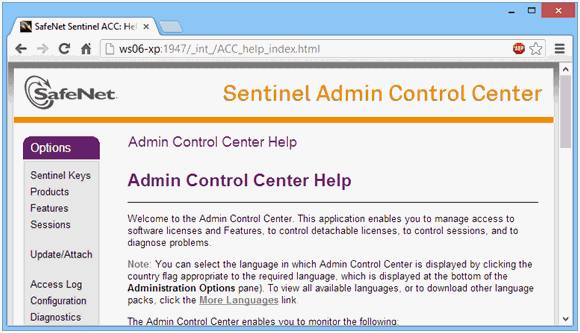
Enter the following URL: http://<hostname>:1947
The following screen should be displayed:
-
If this step failed the issue could be one of the following:
-
The sentinel server is down.
-
If you were able to connect to the ‘Sentinel Admin Control Center’ try to check you proxy Java settings.
-
In the ‘Control Panel’ select "Java":

-
Select ‘Network Settings…’ and verify your proxy setting is correct and aligned with your browser settings.
-
-